Download the Furbo app
Furbo Mini 360° at a glance
- Eco-friendly natural bamboo lid
- Status indicator
- Speaker
- Treat tosser
- 2K QHD camera with automatic night vision
- Microphone
- 360º rotating view
- 6 feet USB-C cable
Setting up your Furbo Mini 360°
|
Find a compatible USB-C power adapter. Note: Adapter is not included in the box |
| Output Voltage: 5V, Output Current: > 2A, Minimum Power Output: 10W |
👉 Find official Furbo adapter here.
| Plug in your Furbo Mini 360° |
| Wait for the yellow blinking light |
Note: Allow 5-10 seconds for starting up
| Download the Furbo app and continue setup |
For iOS users
For Android users
Placement guide
1.5-4 ft off the ground for maximum coverage and 360° rotation
If you are having trouble connecting during setup, move the camera to within 15 ft. of the router.
Setting up your treat toss
| Gently lift the magnetic bamboo lid. |
| Check the Treat Guide for suitable treats. Insert them vertically, one at a time. |
Treat Guide
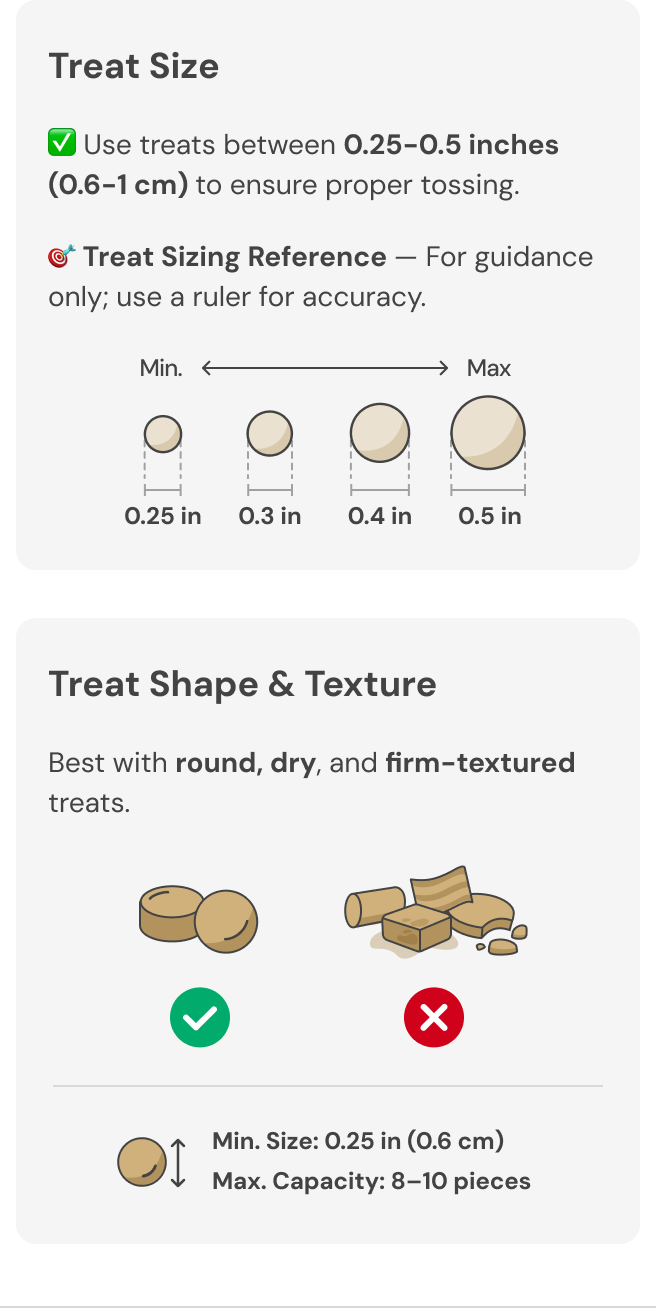
👉 Find Furbo recommended treats here.
Status indicator
| SOLID - Starting up | |
| BLINKING - Ready for setup | |
| SOLID - Standby mode | |
| SOLID - Live view mode | |
| BLINKING - Voice control mode | |
| BLINKING - No Wi-Fi connection |
Specs
- Size: 3.66 x 3.55 x 3.55 inches (9.3 x 8.7 x 8.7 cm)
- Weight: 250g
- Camera: 2K QHD, 126° wide-angle lens, Color Night Vision, 8x digital zoom
- 2-Way Audio: Built-in speaker, high-quality microphone
- Power: 5.2V/2A (10W)
- Connectivity: 2.4 GHz Wi-Fi (802.11 b/g/n), Bluetooth 4.2 (BLE)